Sigma Online User Manual
Creating a Gaps in Data Strategy
- Kim Blake
A gap in the data is defined as a single missing or series of consecutive missing interval meter readings from a periodic channel.
For example:
- A periodic channel which is recording data every half hour - If there are any half hour periods without a reading, then this would be deemed a gap
- A periodic channel which is recording data daily - If there are any days missing a reading, then this would be deemed a gap
Note, it is not limited to half-hourly only, if your data is received every 15 minutes, or 5 minutes, then the system will support this.
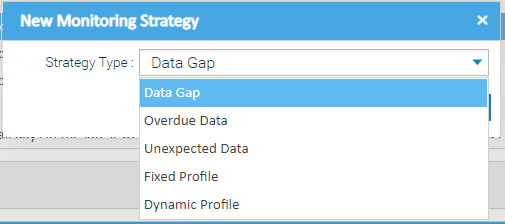
Creating a Data Gap Strategy
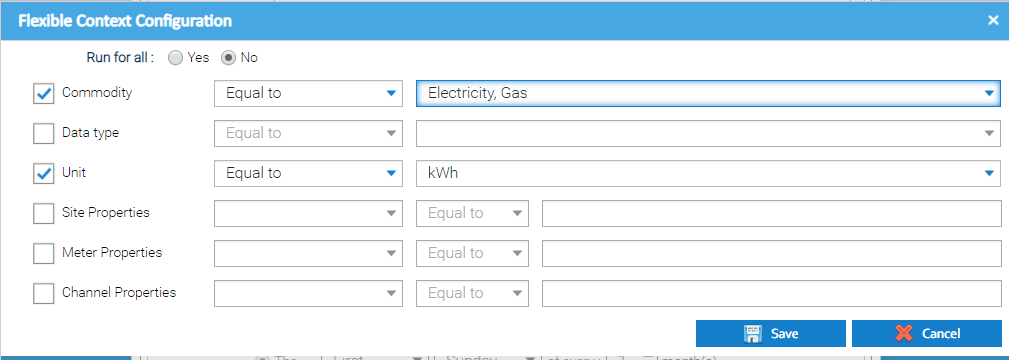
The top section of the Monitoring Strategy Editor is common to all the different monitoring strategy types that can be setup. The details that need to be entered are as follows: The field is disabled and displays the Strategy Type being created Choose the importance of any notifications that are created against this strategy. Available options are: Choose from: Fixed - allows you to drag and drop individual Channels. Click here for more details Flexible - allows you to configure the set up to automatically include Channels, see below for more details Tick if you want Sigma to send summary notifications that are raised on a regular basis. Note, you can also manage a Strategy in Schedule Management Activity if an email address is added Enter email address(s) to send a summary notification to. More than one email address can be entered, and will need to be separated with a comma. Choose from Note, there are more options depending on which of the above you have chosen, see below for more details on the configuration options. It is possible to define which periodic channels the strategy should run for. This will help you ensure your strategies continue to run as your energy estate evolves and assets change/get added. Either: OR The available options are: Commodity, Data type, Unit, Site Property Keys, Meter Property Keys, Channel Property Keys. For example, the above configuration would include all Electricity and Gas Channels that have a unit set to kWh. As new channels that match these parameters are added to your estate, the monitoring strategy would automatically include them when it runs. If you want to be notified of new issues by email, you can choose how often you should get an email and who the email should be sent to. Emails will contain a summary of new notifications that have been raised since the last email was received. It will also contain a summary of all the outstanding notifications. Creating the Strategy

Monitoring Strategy Details
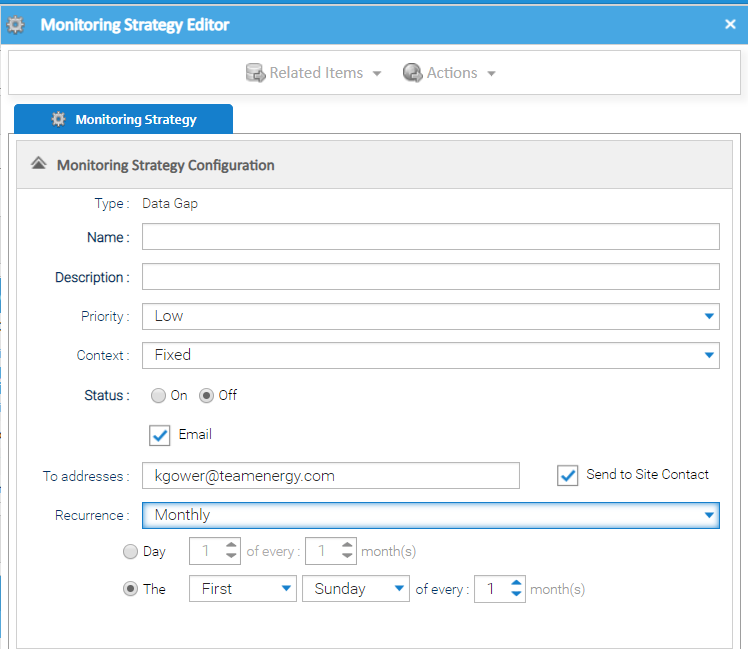
Field Default Details Type N/A Name Empty Enter a name - mandatory Description Empty Enter a description - mandatory Priority Low Context Fixed Status Off Choose On or Off to determine whether the system performs the checks Email Empty To addresses Empty Send to Site Contact Empty Tick if you want to send an email to the Site Contact (entered in the Site Editor) with a summary of notifications that relate to the assets on their site only. Recurrence Monthly Channel Context Configuration
A monitoring strategy can have a "context" of either:Setting up Flexible configuration:

 to show the Flexible Context Configuration popup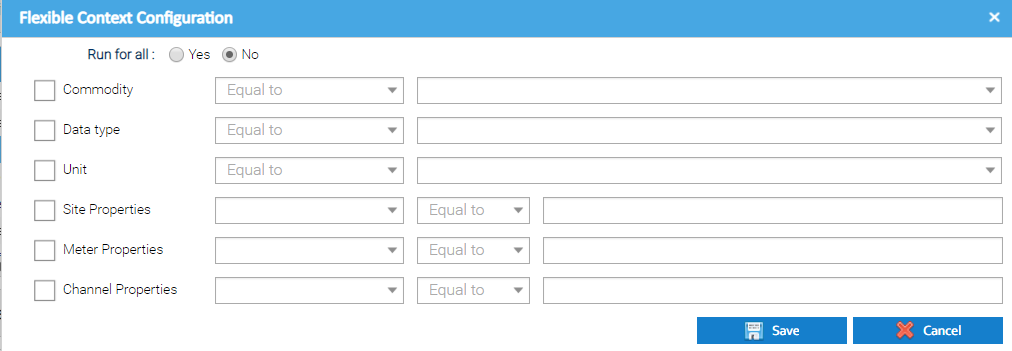

Email Options

 if you want to send an email to the Site Contact (entered in the Location tab in the Site Editor). If this option is selected, the site contact will receive an email containing a summary of notifications only for the sites that they are responsible for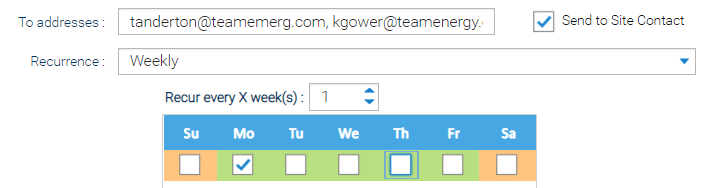
Data Gap Configuration
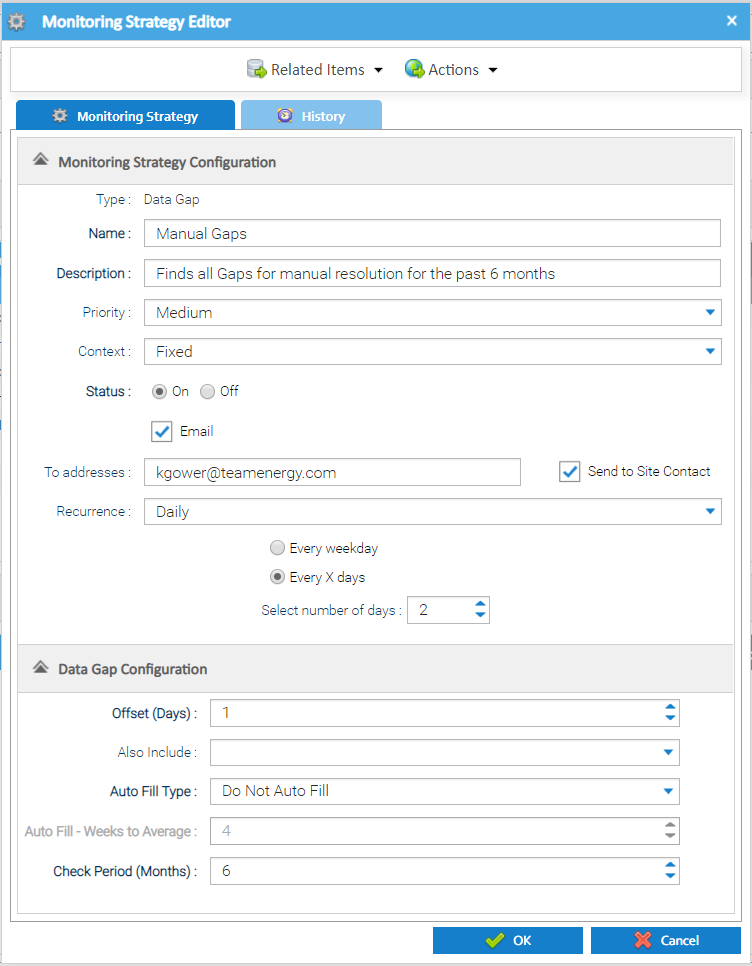
The Item Editor also contains a Data Gap Configuration section that allows you to set the specific configuration to use when finding and managing the gaps.
| Field | Default | Description |
|---|---|---|
| Offset (Days) | 1 | Choose the offset between the end date of the gap and the current date. This is to enable a lag time between the date that is being checked and when the check is being performed to give the chance for metering systems to correct themselves. For example, a metering system may be set up to send a daily drop of information, and then a weekly summary for the previous 7 days to correct any potential errors. In this case, the offset could be set to 7 days to allow the weekly summary upload the chance to correct the data before any problems are identified. |
| Also Include | All Unchecked | Define the combination of data values that should be considered missing data. Options include:
|
| Auto Fill Type | Do Not Auto Fill | Choose from:
Please note, where the system is configured to fill all gaps automatically, if it finds a channel with more than 100 different gaps that need to be filled at the same time, then the system will not attempt to fill the gaps, but will instead raise the notification with a status of "New" so they can be manually reviewed and the necessary action taken. This is to highlight a potential fundamental problem with the ongoing recording of the metering data, or where a strategy may be incorrectly configured. It prevents the system from manipulating the data which cannot then be reversed. |
| Auto Fill - Weeks to Average | 4 | Specify the number of weeks that should be used to create a period average when automatically filling data gaps. More information about how this feeds into the system processing that it supports when filling the data can be seen here. |
| Check Period (Months) | 12 | The number of preceding months that Sigma will check for gaps. For example, if you choose 12, Sigma will check the previous 12 months for any gaps |
- Click OK to save the Monitoring Strategy
Related content
@ Copyright TEAM - Energy Auditing Agency Limited Registered Number 1916768 Website: www.teamenergy.com Telephone: +44 (0)1908 690018